
10 questions for system vendors: what you can check, what needs proof
Almost every back office vendor says similar things on the home page: fast, secure, complete, comprehensive, which are hard to tell apart. Anyone planning a turnkey betting website should move from reading advertising to asking questions you can check. This article offers 10 that you can use with any vendor, EVOTEX included.
Contents
Every question has three parts: why ask it, how to check it yourself in the EVOTEX demo, and the answer you should hear. If another vendor has a demo, use the same way of checking. The labels used: "can be tried in the demo" means you can press it in the demo with sample data, and "sample" means there is a page to look at but the numbers are simulated.
Not for: people who want us to compare a list of vendors for them, because this article names no other vendors, and it isn't legal advice.
How to use these 10 questions
Try these three steps with every vendor, then keep the answers to compare in a table.
- Send the questions as text, not by asking aloud, so you have answers you can keep
- Ask to try the demo yourself, rather than watch the vendor click through it
- Write down in three separate columns: really checked yourself, heard but not seen, and couldn't answer
Cautions when reading the answers:
- For a number that doesn't say how it was counted, ask how it was counted
- For claims like "better than everyone else" or "number one", ask for evidence you can open and look at
- For the word automatic, ask which parts run by themselves and which need a person to press
- If the demo uses sample data, the vendor has to say clearly that it is only a sample
Questions 1 to 3: trying it, what you get, and how money work starts
Question 1: can you try the system before buying, and is what you try real data or sample data?
Why ask: a demo that needs sign-up, or waits for a salesperson to open it for you, is often a prepared picture. And no one brings real data to show you before you buy.
Check in the EVOTEX demo:
- Open try the back office with sample data (page in Thai). It is free and needs no sign-up
- Look at the strip at the very top of every page. It always says sample data
- The sign-in page has sample accounts to choose from, and the side menu has 18 items to open
The answer you should hear: the vendor says plainly that the demo is sample data and isn't connected to a live system. At EVOTEX, the whole demo is sample data and isn't connected to any brand's live system.
Question 2: what do you get in one bundle when you buy, and does it include a player site?
Why ask: with some vendors, the price you see covers only the back office, while the player site and game providers are charged separately, so the real total is higher than you thought.
Check in the EVOTEX demo:
- Open the Player site page in the back office and see that the admin controls the game providers, banners, logos, and colors of the player site from one menu
- Open the packages and pricing page (page in Thai) and look at what the package includes
The answer you should hear: a list written as points saying what is included and what costs extra. At EVOTEX, the back office and the player site come in one bundle in the package, and add-ons have their own list on the packages page.
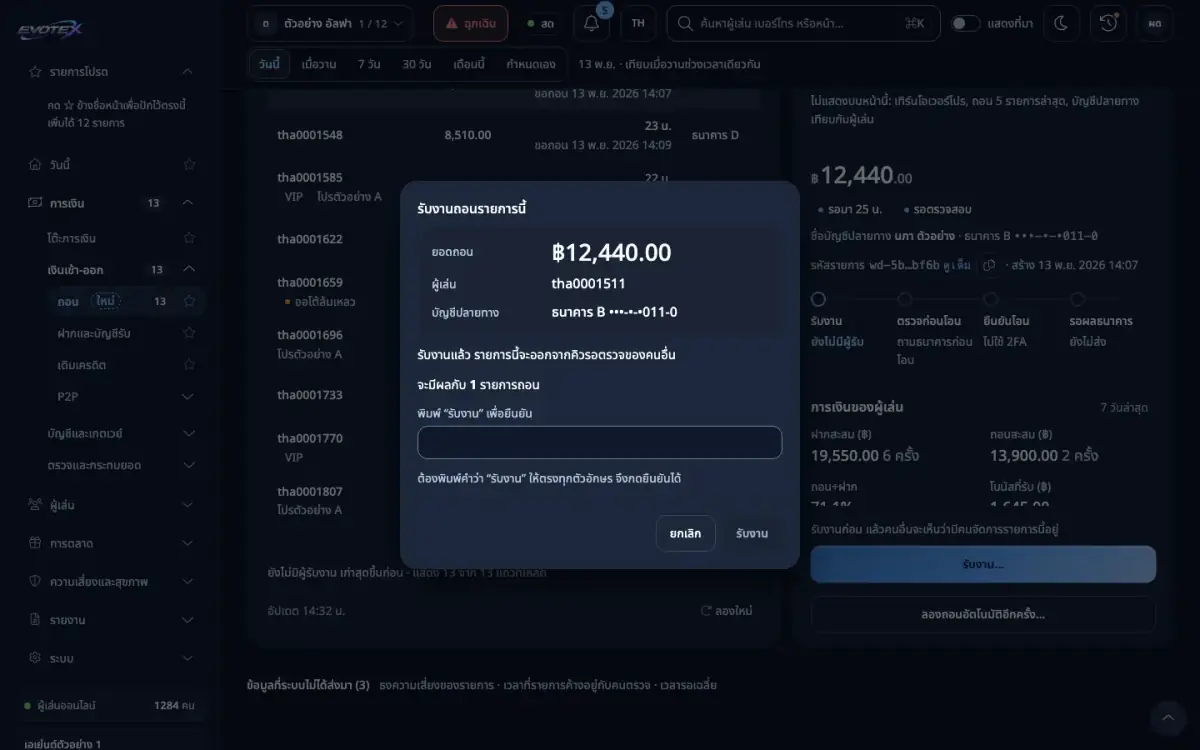
Question 3: how does the withdrawal queue work, and what happens if two people press approve on the same item?
Why ask: money that has gone out can't be recalled, so the point where money leaves should have a clear procedure.
Check in the EVOTEX demo:
- Open the Withdrawals page and see items split into ready, awaiting review, and claimed
- Press review to claim an item. If someone else holds it, the button is locked
- Press approve and see the confirmation box that summarizes the item and has a 6-digit OTP field
The answer you should hear: there is a step to claim an item, and a way to handle unusual items. At EVOTEX, the Exceptions tab has 12 ways to handle them. Read the full steps in how the withdrawal queue works
Questions 4 to 6: automatic, money with an unclear answer, and team permissions
Question 4: for automatic deposits and withdrawals, what does the system do by itself, and what needs an account or permission from another provider?
Why ask: the word automatic sounds as if everything finishes by itself, but in fact it usually needs receiving and payout accounts and a connection with a payment provider, which belong to the other party.
Check in the EVOTEX demo:
- The Deposits page has filters for automatic and manual top-up that split items into two kinds
- The Payments page has an automatic flag per receiving and payout account, and a rotation plan by time or by amount
- The Exceptions tab of the withdrawal queue has a way to let the system retry the automatic payout
What the demo can't let you check is picking up real deposit amounts, because that part sits in the backend systems and with the provider, not in the back office you see in the demo. At EVOTEX, the deposit channels open to players depend on each brand's connections. Ask our team when you discuss the scope. The answer you should hear is a list that says which parts the provider does and which parts the brand must prepare. Read more in how automatic deposits and withdrawals work
Question 5: when the bank or the provider's answer is unclear, where does the money stay, and who closes it?
Why ask: items with an unknown result are where the risk of paying twice is highest. A system that has no place to hold such items leaves the team to fix them by hand.
Check in the EVOTEX demo:
- Open the money with an unknown result page and see the summary of open, closed, and longest open
- Read the yellow strip on the page: the system won't accept a repeat payout or top-up order on these items until the item is closed
- Press review and close on any row. It needs the result, a note, and an OTP
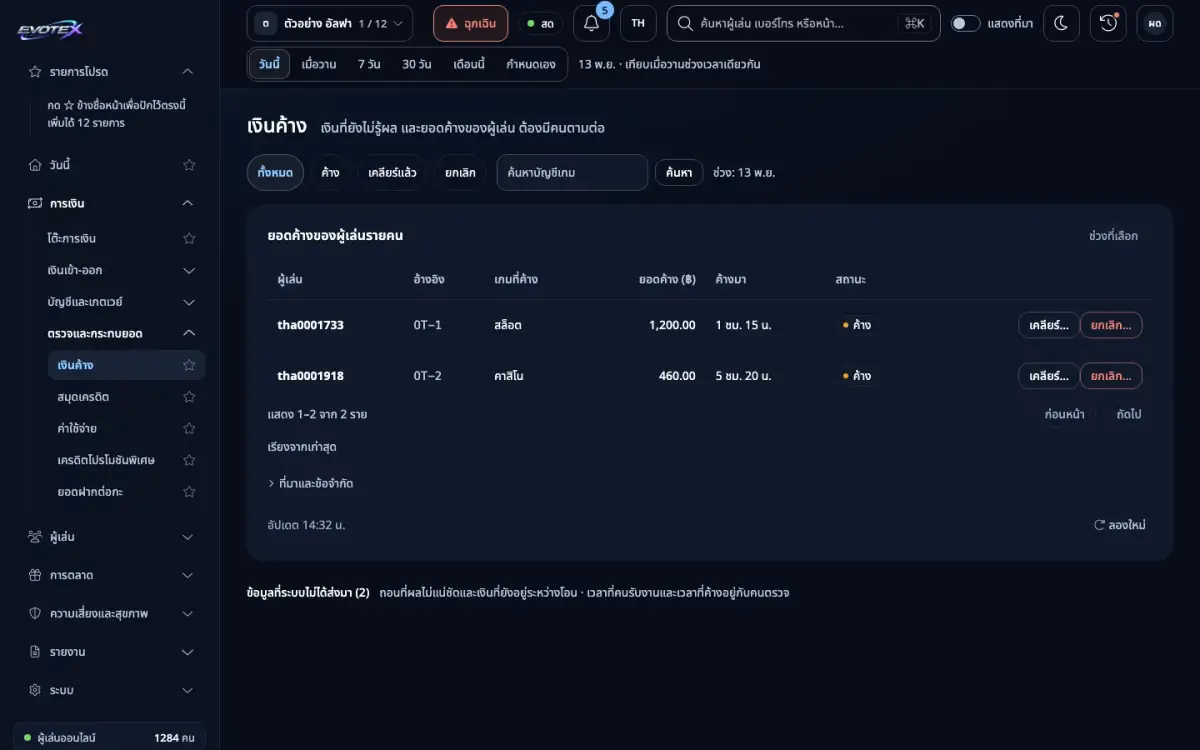
The rule that locks repeat orders is behavior of the backend system according to the API contract document. The demo shows the screen, but it has never called a live system. Ask our team how they check this behavior for you at setup.
Question 6: how finely can you set team permissions, and who sees what?
Why ask: a team has several roles, and not everyone should press approve on money.
Check in the EVOTEX demo:
- Open the Team and permissions page, the Roles and permissions tab, and see 14 roles: 10 standard ones and 4 that a group created itself
- The permission table for every role splits 41 menus and 7 actions: see the menu, create, edit, delete, approve, export, and view the full number
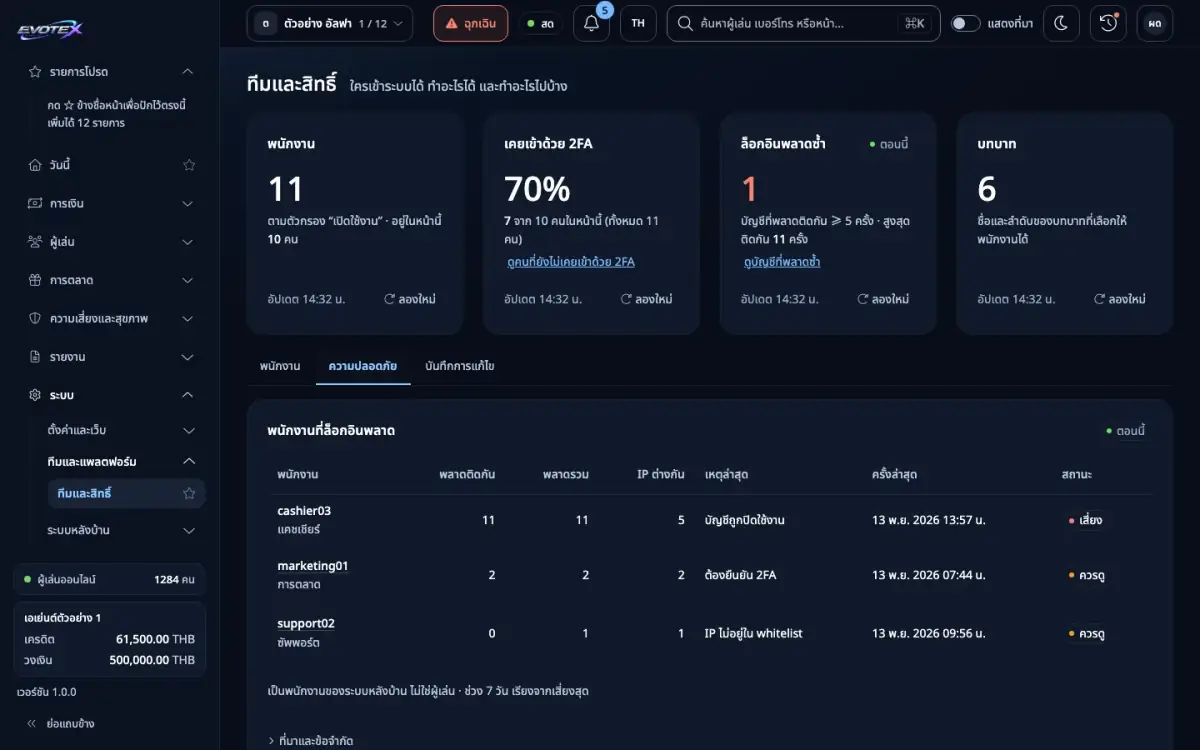
Good to know, and to be said plainly: in the demo, the side menu is the same for every account at the same level. Hiding menus by real role is set at setup. The answer you should hear is that the vendor can separate what can be seen in the demo from what has to be checked in real use.
Questions 7 and 8: looking back, and mobile
Question 7: can you look back and see who pressed what, and when?
Why ask: when the numbers don't agree, or an item goes missing, there has to be a place to trace back.
Check in the EVOTEX demo:
- Open the history and security page, the Who did what tab, and see a list of actions with results, times, and partly masked IPs
- Filter by what was done and the date range, and view only failed or rejected items, then export CSV
- Look at the Sign-ins and Allowed IPs tabs
The answer you should hear: the history has the name of the person who acted, the time, and the result. As for a record of page views, EVOTEX doesn't have one yet. The system logs only approvals, exports, and value edits.
Question 8: does it work on mobile, and has it been checked on real devices?
Why ask: finance and support often have to answer away from their desks.
Check in the EVOTEX demo:
- On the demo page, press the Mobile 390 px button and try approving a withdrawal on that screen
- Check that tables become cards and that other pages can still be read and pressed in full
The answer you should hear: it says what screen size was checked and what it was checked on. At EVOTEX, it was checked in a browser at 390 px, and real iOS and Android devices haven't been tested yet. Read more in using the back office on mobile
Questions 9 and 10: price, and launch timing
Question 9: what does the price include, what are add-ons, and how do you stop using the service?
Why ask: the starting price is an attractive number, but the real cost includes what you have to add.
Check on the EVOTEX packages and pricing page (page in Thai):
- The package lists everything included, and the add-ons have their own list
- The terms: no fee per transaction, and you can cancel with 30 days' notice
The answer you should hear: a quote that states the hold rate, the vendor's share, add-ons, and the cancellation terms in writing. If you want to see an example of adding up the numbers, read worked examples of launch costs
Question 10: when can you open, and what is still a draft or not connected to a live system?
Why ask: these two go together. A fast launch date often comes with parts that aren't finished.
Check in the EVOTEX demo:
- Many pages are labeled sample data or not connected to a live system at the points that are still simulated, for example real-time alerts and the Player behavior page
- Ask every vendor to split the list into three groups: parts that work now, parts that are samples, and parts that exist only as a design
The answer you should hear: a launch date that is a target with conditions. At EVOTEX, the target is to open a new brand within 14 to 21 working days after the scope is agreed. It is our team's target, not a promise. Read the week-by-week plan in the plan to open a brand in 14 to 21 working days
Summary table: put it next to each vendor to compare
| No. | Question | Check it yourself at | If they can't answer, ask for |
|---|---|---|---|
| 1 | Can you try before buying, and is it real or a sample? | A demo you can open yourself | A demo link that doesn't wait for a salesperson |
| 2 | What do you get in one bundle? | The pricing page and the player site menu | What is included and what costs extra, as text |
| 3 | The withdrawal queue and claiming items | The Withdrawals page and the confirmation box | The approval steps, one at a time |
| 4 | What does automatic do by itself? | The Deposits and Payments pages | A list of who does what |
| 5 | Money with an unclear answer | The page for money with an unknown result | The closing steps and who closes |
| 6 | Team permissions | The Team and permissions page | The permission table of every role |
| 7 | A history of who did what | The history and security page | A sample record you can export |
| 8 | Use on mobile | The Mobile 390 px button | What devices it was checked on |
| 9 | Total price and add-ons | The packages page | A written quote |
| 10 | Opening time and what is still a sample | The labels on the demo pages | A status list: works, sample, designed, not in the demo |
Questions the demo can't answer: ask for them in a document
Some things have no screen to try. Every vendor, including EVOTEX, must answer in text that you can keep.
- Can you export the brand's data, in what format, and how long does it take?
- Who owns the brand's domain, and can you move it out?
- Who owns the brand's payment accounts and chat channel accounts, and can you move them out?
- What hours is support available, how fast does it answer, and is there a separate channel when money is stuck?
- If the system has a problem on a day with heavy money movement, who is responsible for what?
The laws of the market you open aren't something the system vendor can answer for you. Ask your own legal adviser.
What to ask our team
The points below are ones this article can't confirm on behalf of our team. Ask when you agree the scope.
- How does the back office demo differ from the real system set up for a brand?
- When can the parts labeled not connected to a live system in the demo be connected?
- Which deposit channels can the system pick up automatically for our brand?
- How can we check the behavior for unclear items and the lock on repeat orders on the real system?
- Will fine-grained team permissions be set up for us from day one?
- How long does a quote take to prepare, and what can change after signing?
Keep reading
- How to choose a back-office system: the criteria to use alongside these 10 questions
- What a back office must have: a 12-point checklist split by role
- Launch checklist: 10 points: what you need to prepare on your side
- Our strengths (page in Thai): short questions to ask every vendor
- Try the back office with sample data (page in Thai): check it yourself right now, with no sign-up
Our team's target is to open a new brand within 14 to 21 working days after the scope is agreed. See what the package includes on the packages and pricing page (page in Thai)
Related features
- Approve, and see the result in the same row sample in the demo
- Set roles yourself, with permissions to tick across 41 menus sample in the demo
Related reading
How to choose a back-office system
Questions to ask a vendor
What a back office must have
A good back office gives the owner the whole picture on one page and lets the finance team close money work fast.
Launch checklist
What to prepare before launch day

Request a demo
Want our team to look at the real thing with you? Request a demo.