
Choosing a betting site back office: 8 criteria and vendor questions
By the end you will have one set of criteria to compare every vendor, and a scorecard you can use right away. No technical background needed.
Contents
Your team opens the back office every day. If you choose the wrong one, the slowness and the mistakes pile up on every shift.
This article helps you compare several vendors with one set of criteria. It's written so brand owners and operators can use it right away, with no technical background needed.
Before you look at any system, answer three questions of your own
- How many brands do you manage: one brand, several brands in one group, or several groups?
- Who on your team will use the system every day: the brand owner, the finance team, the marketing team and support?
- Which back office do you use now, and what do you need to move over?
A vendor should ask you the same questions. The EVOTEX Request a demo form has fields for the number of brands and the back office you use now.
The 8 criteria for choosing a system
1. How finely can you split roles and permissions?
The finance team shouldn't see the marketing team's menus, and the other way around. Ask whether you can add or remove people yourself, set roles, and choose the scope of permissions.
2. Which page does the money work happen on?
Check whether deposits, withdrawals, and commissions each have their own queue, and whether you see the result in the same place after you approve. For the withdrawal queue, read how the withdrawal queue works
3. Does it really work on mobile?
Don't trust the words "mobile friendly". Open it yourself. Check whether you have to scroll sideways to find a button, and whether you can approve an item from a phone.
4. Do the numbers agree on every page?
The same number on two pages must not contradict itself. Try comparing the total on the summary page with the list page.
5. Can you look back and see who did what?
A system that moves money must keep an activity history. Ask whether you can see the sign-in history and the history of who pressed approve.
6. Does it support several brands?
If you plan to grow into several brands, ask whether you can compare brand by brand on one page, and whether you can export to a file.
7. How does migration from your current system work?
Ask whether member data, the agent structure, and financial history can be moved, and whether anyone helps plan the move and train your team.
8. Security and where the data is stored
Ask directly where the data is stored, how it is encrypted, how it is backed up, and what is real and in use versus only designed, not in the demo.
What to try once you request a demo
A good demo lets you press the buttons yourself instead of watching slides. Try these three things:
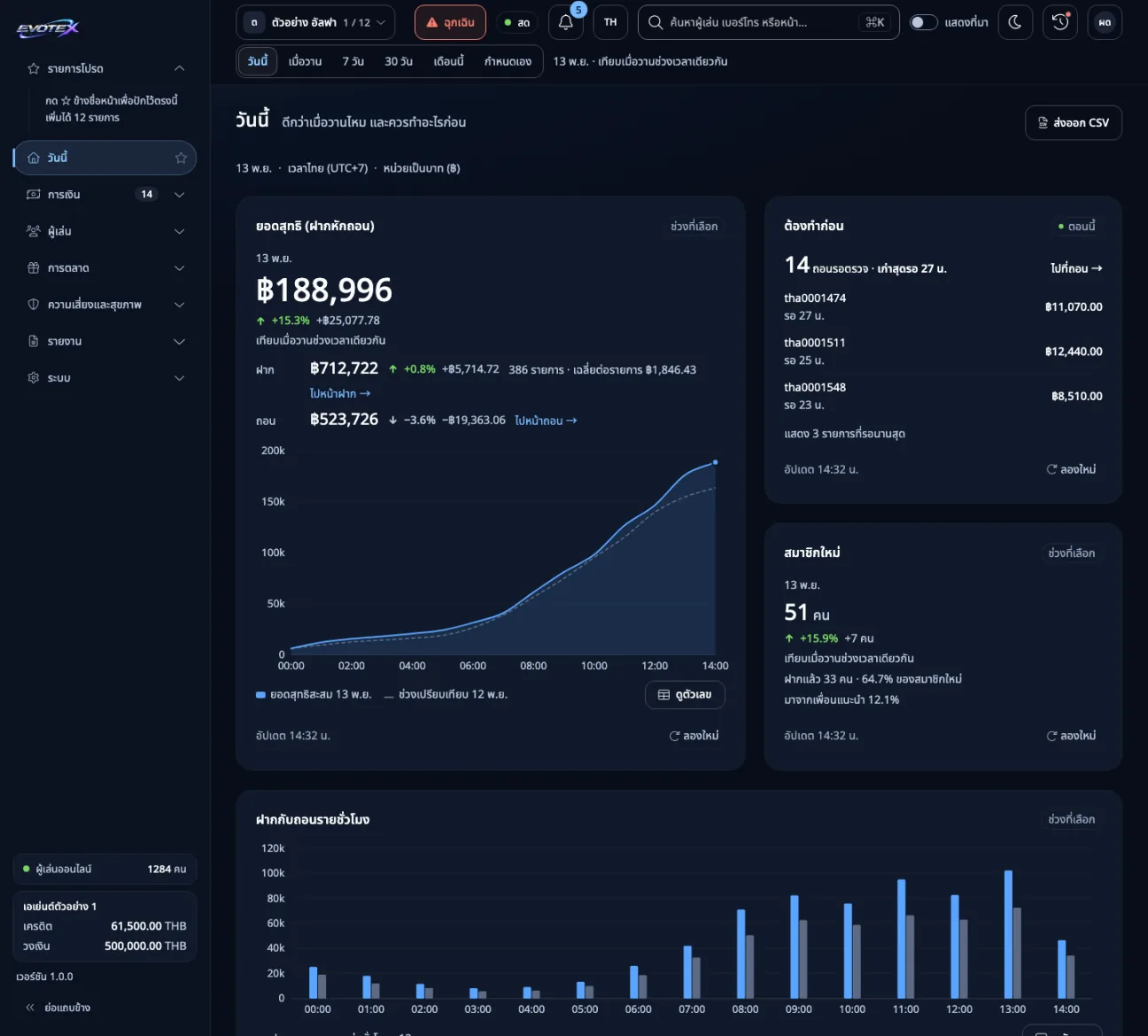
- Open the system's first page and see whether you can tell how many pending withdrawals there are
- Go to the Withdrawals page and try approving or rejecting one item
- Switch to mobile at 390 px wide and see how the same page rearranges
The data in the demo should be sample data that has nothing to do with anyone's real money. If a vendor lets you click on another brand's real data, ask why.
Questions to ask a vendor
- Which parts of the system are in real use, and which are only designed, not in the demo?
- Are the numbers in the demo real, or sample data?
- Can the system connect to the back office I use now?
- Who helps on the day you switch systems, and for how long?
- How is the scope of use divided, and can you request a quote by scope?
- If you expand to several brands later, what has to change?
Signs that call for more questions
If you see any of these, ask more:
- They answer every question with "yes, all of it", but won't let you try it in the demo
- You can't tell what is in real use and what is still a plan
- They won't say what is still not fully tested
A vendor who speaks plainly will tell you themselves. For example, EVOTEX says it has checked mobile in a browser at 390 px wide, and hasn't yet tested on real iOS and Android devices.
Where EVOTEX answers these criteria
As far as this page can confirm:
- Roles and permissions: add or remove people, set roles, and choose the scope at the level of a brand, a group, or the platform
- Money work: withdrawal, deposit, and partner queues are separate, and you approve or reject from a single page
- Mobile: every page is designed to work at 390 px wide
- Several brands: the group-level Today page is a table by brand, and it can be exported as a CSV file (designed, not in the demo)
- Activity history: you can see who did what (sample in the demo)
- Migration: our team helps plan the move of member data, the agent and sub-agent structure, and financial history, and trains your team
- Security: where data is stored, encryption, and backups are shared by our team during your demo call
- What you get: EVOTEX gives you the back office and the brand's player site in one bundle. The scorecard below rates the back-office part
You can read the overview of the back-office system (page in Thai) on that page.
Scorecard
Copy this and fill it in while you watch each vendor's demo. Score each item from 1 to 5.
| Criterion | Vendor A | Vendor B | Notes |
|---|---|---|---|
| Roles and permissions | |||
| Money work from one page | |||
| Use on mobile | |||
| Numbers agree on every page | |||
| Activity history | |||
| Several brands | |||
| Migration | |||
| Security and data storage |
Summary
Choose a system by what you can press, not by what it says about itself, and write down what is in real use and what is designed, not in the demo.
Keep reading, depending on what you are doing:
- Want to see the EVOTEX scope of use? See renting the system (page in Thai)
- Want an overview of launching a turnkey betting website with EVOTEX? Read the home page
- Before you request a quote, read cost structure and build it yourself or use a ready-made system alongside it
Related features
- The alerts inbox, sorted by urgency designed, not in the demo
- Set the time for pending withdrawal alerts, and the channels designed, not in the demo
Related reading
How the withdrawal queue works
The finance team's order of work
Build it yourself or use a ready-made system
What your team is responsible for if you build the back office yourself

Request a demo
Want our team to look at the real thing with you? Request a demo.