
Moving from your old system: cost, time, and a data worksheet
People who already use another back office often have two questions that are hard to answer: what will it cost to move, and how long will it take. People preparing a turnkey betting website on a new system don't face this, but people moving over need to know the numbers and prepare their data first, because the price and the time depend on the data you have.
Contents
The article migrating your old back office already walks through all 8 steps, from naming an owner and running two systems in parallel to the rollback plan. This article doesn't repeat that. It adds three things that one doesn't have: the migration price and timing numbers, a data preparation worksheet you can fill in, and what you need to know about what the back office you see in the demo can take in.
Not for: people looking for a self-service data migration tool, and individual players, because this article is written for operators planning a migration, and it isn't legal advice.
The numbers we can confirm about migration
Every number in this section comes from the price list and the time target that EVOTEX states. There are no other numbers that we can confirm.
| Topic | What is stated |
|---|---|
| Cost to move from your old system | THB 25,000 to 80,000, by the size of the data |
| How it is charged | As an add-on, separate from the package |
| Time to open a new brand | A target of 14 to 21 working days after the scope is agreed |
| What our team helps with | Planning the move, and training your team (not yet stated whether this is included in the moving fee) |
The price range from lowest to highest is wide enough to change the total budget a lot, which means the size of the data has a big effect on the price. Before you request a quote, you should know how much data you have. The lowest price doesn't mean you will get that price. The highest price isn't a cap agreed in a document with you either, until it is in the quote.
If you want to see the moving fee added to the package for one brand, see the table in worked examples of launch costs. You don't need to add it up yourself. The time target of 14 to 21 working days is our team's target, not a promise.
What the numbers above can't tell you yet:
- How large the data is at the lowest price, and how large at the highest price
- Whether the migration work is counted inside the 14 to 21 working day clock or separately
- If the numbers after the move don't agree, whether reloading the data costs extra
Ask our team these three when you agree the scope, and ask for the answers in writing.
What the back office you see in the demo can take in
You need to know this fact before you plan, because it decides whose job the migration is. The back office you see in the demo has no tool for importing the brand's core data. This table says what you can do in the demo and what is our team's work.
| Data | In the back office you see in the demo | Whose migration work it is |
|---|---|---|
| Players | You can add them one at a time on the Players page. A phone number is required. There is no file import button | A service of our team (ask about the method and the file format) |
| Financial history: deposits, withdrawals | You can view it on the Withdrawals, Deposits, and Reports pages. There is no button to import past history | A service of our team (ask how far back you can move) |
| Agent and sub-agent structure | There is no page for managing an agent structure. There is only the partners' commission withdrawal queue | A service of our team (ask where the structure is kept after the move) |
| Team users and permissions | Add members on the Team and permissions page. The system creates an account with a password and tells the person. There is no email invitation | Our team sets them up from the list you send |
| SMS recipient list | You can import csv, xlsx, or xls files, up to 5 MB | You can do it yourself |
| Player site theme | Export and import a JSON theme file in the editor, but this part is a sample in the demo | See [adapting your player site to your brand in 7 working days](/guide/brand-in-7-days/) |
Our team states that it helps plan the move of member data, the agent and sub-agent structure, and financial history, so we don't write that the back office imports them automatically. This work is a service of our team, charged as the fee for moving from your old system. It isn't a button you press yourself in the back office.
What data size means: what is likely to move the price
The term data size in the EVOTEX price list hasn't been broken down into what is counted. The list below is a general observation about migrating a system like this. It isn't an EVOTEX pricing formula. Use it as a list of numbers to write down before you ask for a price.
- The number of members to move, both active ones and ones that haven't been used for a long time
- The number of brands and groups moved at the same time
- The number of agent levels, and the total number of agents
- How many months of financial history you need to move back
- What format your old system can export data in, and whether the files are clean or need cleaning first
- Items still pending on switchover day, for example withdrawals waiting for a decision, or money with an unknown result
These numbers have to come from you. Our team doesn't see your old system before you talk. The more you can answer with numbers, the more accurate the quote.
A data preparation worksheet before you request a quote
You can use this table as a worksheet right away. The third column is what you need to write down before you send it to our team. The fourth column is where that kind of data ends up in the back office you see in the demo, which helps you see where the data you send will be used.
| Data | What to export from your old system | Write down the numbers | Where it ends up in the new back office |
|---|---|---|---|
| Members | A list file with name, username, phone number | The total, and the number active in the year | The Players page |
| Balances and member status | A file of balances per person, and status | The total balance, the number suspended or under watch | The Players page, the balance and status columns |
| Members' deposit and withdrawal accounts | A file of the accounts linked to members | The average number of accounts per person | The Bank accounts tab in a player profile |
| Agent structure | A chart of who sits under whom | The number of levels, the total number of agents | Our team tells you where it is kept |
| Deposit and withdrawal history | A file of past items | How many months back, the number of items | The Deposits, Withdrawals, and Reports pages |
| Commissions owed | The list of requests not yet paid | The number of items and the total | The Partners page |
| Open promotions | The list of promotions with conditions | The number of promotions still in use | The Promotions page |
| Team users and roles | Name, position, phone number | The number of people per role | The Team and permissions page |
| The brand's receiving and payout accounts | The list of accounts in use | The number of receiving accounts, the number of payout accounts | The Payments page |
| Domains and chat channel accounts | The list of domains, and the LINE accounts in use | The number of domains, the number of accounts | The Settings page and the Chat page |
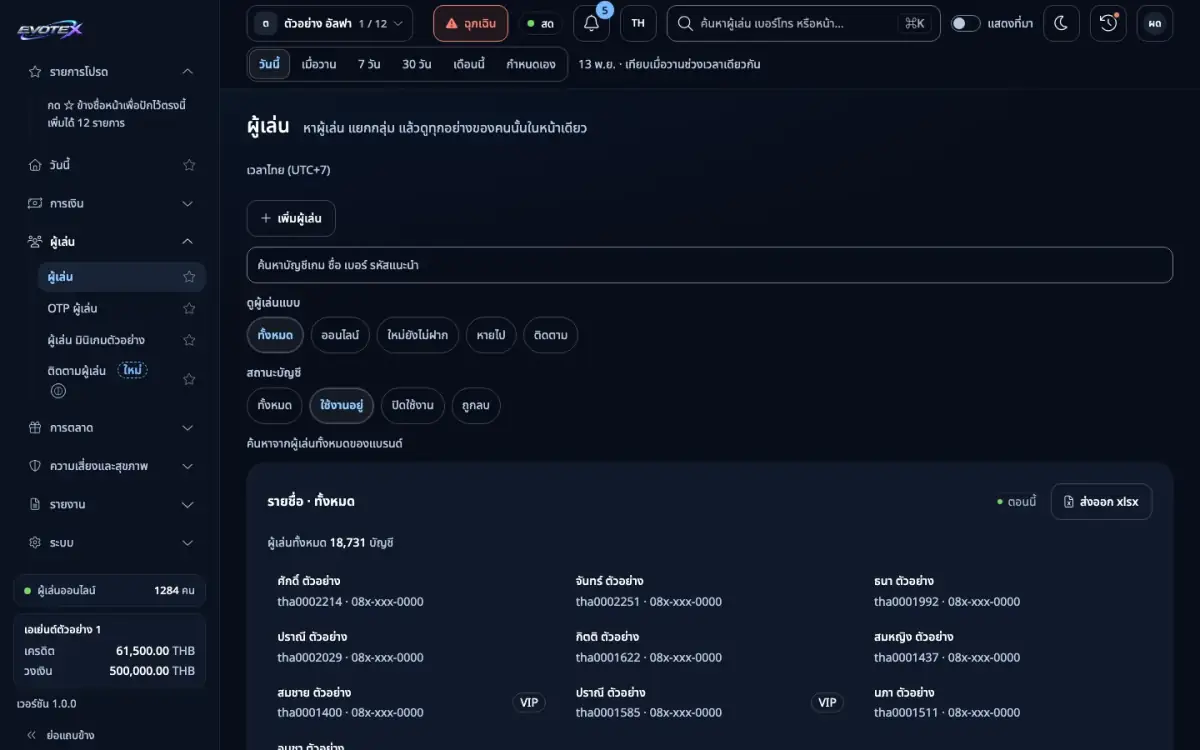
The Players page you see in the image is an example of the destination. The table lets you show or hide columns, search by name, username, or phone number, and save filters for reuse. Phone and account numbers are always partly masked. All the data in the image is sample data.
Time: an example of laying out the migration against the plan for opening a new brand
The target of 14 to 21 working days is for opening a new brand. It isn't yet stated whether it includes migration work. This table is an example that we recommend for laying out the migration against that plan. It isn't a schedule agreed in a document. Our team will arrange the real work by the size of your data. The three-week plan for opening a brand is in the plan to open a brand in 14 to 21 working days
| Phase | Your work | Our team's work | By the end of the phase you should have |
|---|---|---|---|
| Before the clock starts | Fill in the worksheet, write down the numbers, send short sample files | Estimate the data size and the price | A quote that states the moving fee |
| Week 1 | Agree a scope that includes the migration, send the full set of files | Receive the files, check they are usable, ask back if anything is missing | The full set of files that our team has accepted |
| Week 2 | Prepare the team and match the old roles to the new | Move the first batch, and set up team accounts | The first batch of data is in the new system |
| Week 3 | Compare numbers on the Today page with the old system | Fix what doesn't agree, move the remainder | The key numbers agree, or you know why they don't |
| Buffer, days 16 to 21 | Rehearse and choose the switchover day | Watch the first round | A switchover day that everyone knows |
What makes the time run over, which is general advice:
- Files from your old system are slow to export, or the format doesn't match what our team needs
- The data isn't clean, for example duplicate phone numbers, or members with no bank account
- Pending items in the old system that aren't closed before switchover day
- Deciding the switchover day late, because you have to wait for the person with the authority to decide
One more thing that is often forgotten is the contract with your old vendor. Check how many days of notice you must give to cancel, then set the switchover day before the end date, leaving time to compare numbers at least once.
The numbers to compare during the parallel run
The parallel run step is already in the migration article. Here we only say which page of the new back office each number can be read from, and how to keep it as a file for reference.
| The number to compare | Read it on the page | Keep it as a file |
|---|---|---|
| The day's net, deposits, and withdrawals | Today and Executive summary | Export CSV from the Today or Executive summary page |
| New members | Today | Export CSV from the Today page |
| Pending withdrawals right now | Executive summary and the Withdrawals page | Take a screenshot, because the Withdrawals page has live numbers that keep changing |
| The total number of players | Players | Export CSV from the Players page |
| Money with an unknown result | Money with an unknown result | Take a screenshot before and after switchover day |
Good to know: the Executive summary page can be exported as a CSV file. There is no PDF, no sending by email, and no scheduled automatic sending. If your team needs a regular report comparing the two systems, ask our team how it would be done.
Matching your old roles to the new roles
You can do this work yourself even before you buy. The demo has 10 standard roles to compare with, split by level.
| Level | Standard roles in the demo |
|---|---|
| Brand | Brand owner, manager, finance, support, view only |
| Group | Group owner |
| Platform team | Super admin, QA, CTO, head of support |
Write a two-column table. On the left are the roles your people have in the old system, and on the right are the closest roles in the new one. For any role with no match, ask our team whether you can create the role yourself. The demo has a role editor and 4 examples of roles that a group created itself.
On accounts: the system creates team accounts with a password and tells the person. There is no email invitation. Prepare each person's name and phone number in full. It is faster than adding them later.
What to ask our team
This page can't confirm these things, so ask when you agree the scope, and ask for the answers in writing.
- What is our brand's data size counted from, and where in the range of THB 25,000 to 80,000 does it fall?
- Is the agreed price for moving from your old system fixed, or adjusted by the real quantity?
- Is the migration work counted inside the 14 to 21 working day clock or separately?
- How far back can financial history be moved, and what file format do you need to send?
- Is there a test system to do a rehearsal load before the real load?
- If the numbers after the move don't agree with the old system, who looks for the cause, and does a reload cost extra?
- Does the moving fee include team training, and how many hours?
- Where in the new back office will the agent and sub-agent structure sit?
Keep reading
- Migrating your old back office: the 8 steps and the rollback plan, which this article doesn't repeat
- Worked examples of launch costs: the moving fee added to the package for one brand
- The plan to open a brand in 14 to 21 working days: the week-by-week plan that the migration has to fit into
- Managing several brands in one back office: if you are moving several brands at once
- Renting the system (page in Thai): the scope of use of the package
- Try the back office with sample data (page in Thai): look at the destination pages for the data you will move, with no sign-up
Our team's target is to open a new brand within 14 to 21 working days after the scope is agreed. The moving fee is an add-on separate from the package. See the full list on the packages and pricing page (page in Thai)
Related features
- Search players by name, number, or by pressing / sample in the demo
Related reading
Migrating your back office
A step-by-step checklist for moving from your current system
Worked examples of launch costs
Work out step by step what a 93% hold rate comes to in money, and how to request a price for several brands.
The plan to open a new brand in 14 to 21 working days
The target is to open a new brand within 14 to 21 working days after the scope is agreed.

Request a demo
Want our team to look at the real thing with you? Request a demo.