
Brand, group, and platform scope: who sees what with several brands
The more brands you manage, the more time you lose signing in and out of each system. So anyone preparing a turnkey betting website with more than one brand should ask from the start whether this back office can view several brands at once, and who sees which brands. This article answers from the screens in the EVOTEX demo.
Contents
The labels used: "can be tried in the demo" means you can press it in the demo with sample data, "sample" means there is a page to look at but the numbers are sample data or aren't connected to a live system, and "designed, not in the demo" means it is laid out in a design but you can't press it in the demo yet. Every image comes from the demo and isn't data from a real brand.
Not for: people who manage one brand and have no plan to expand, because group-level tools won't pay off yet, and individual players.
Brand, group, platform: three terms to tell apart
Before you request a quote, understand these three terms first, because permissions and screens are all split by these three levels.
| Level | What it is | Who is at this level | Pricing |
|---|---|---|---|
| Brand | One site of an operator, with its player site and its team | Brand owner, manager, finance, support | The EVOTEX package covers 1 brand |
| Group | A set of brands that have the same owner | Group owner | Custom terms, as quoted |
| Platform | The top level that manages several groups | Platform admin | Custom terms, as quoted |
Prices and what the package includes are on the packages and pricing page (page in Thai). A simple rule of thumb has three points:
- How many brands do you manage? If it's one brand, use the EVOTEX package
- If it's several brands in the same group, request custom terms
- If you have several groups to watch at once, request custom terms, which include the platform console and everything at the smaller levels
For the cost of one brand, there is a separate worked example in worked examples of launch costs
Switch brands without signing in again
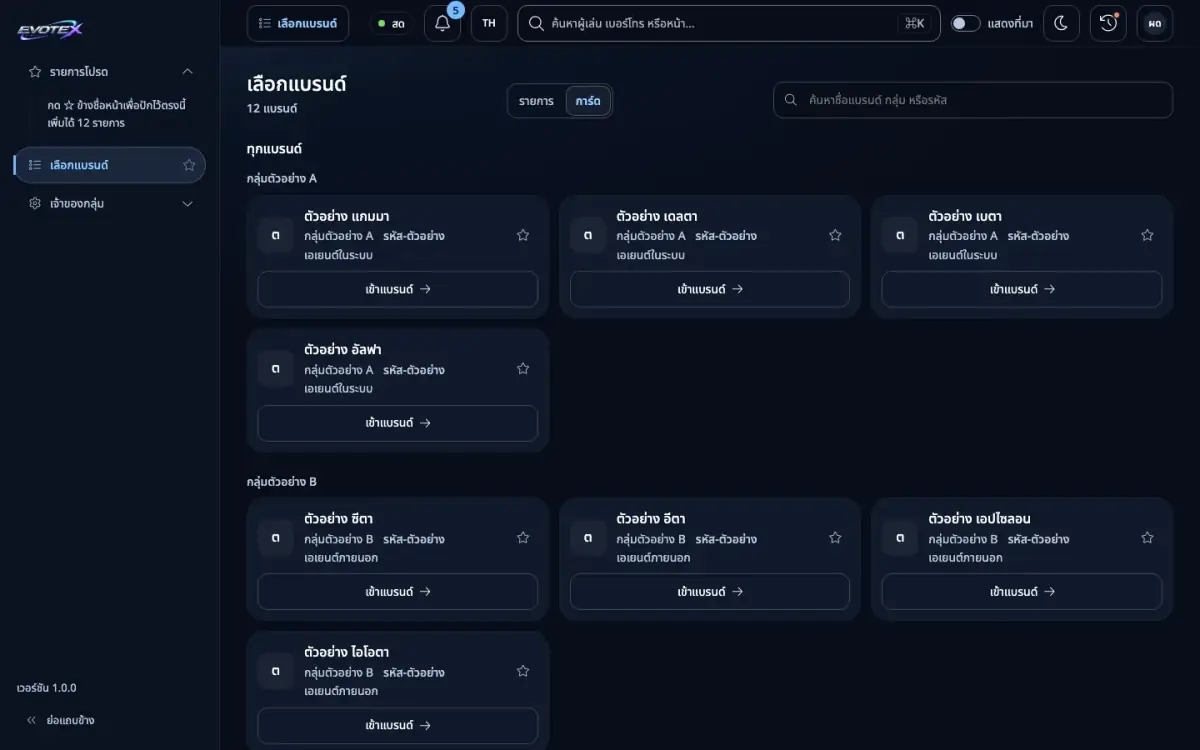
After sign-in, a person with permissions on several brands lands on the Choose a brand to view page before any other page. A person with permission on only one brand skips this page and goes straight to the Today page (can be tried in the demo).
What this page can do:
- Search for a brand or group name
- Choose from a Recent list, which keeps the brands you opened lately
- Choose with the up and down arrows then press Enter, or press / to go back to the search box
- See each brand's status: open, closed, or test
- For the platform team, choose a level to view: one brand at a time, one group at a time, or all groups
Two things to notice in the image. One group has an all brands in the group option, to view all 3 brands together. The other group has a closed brand, which this account can't enter, because while a brand is closed only the platform team can enter. Once you're in, the card under the logo in the side menu always says which brand you are viewing, for example viewing 1 of 3 brands, so you don't press work in the wrong brand by accident.
The group home page: a table to compare brands
The Group home page is a good first page of the day for an owner of several brands. At the top you see the group's total net, compared with yesterday at the same time. Next are the group's deposits, withdrawals, and new members, with the share by brand (can be tried in the demo).
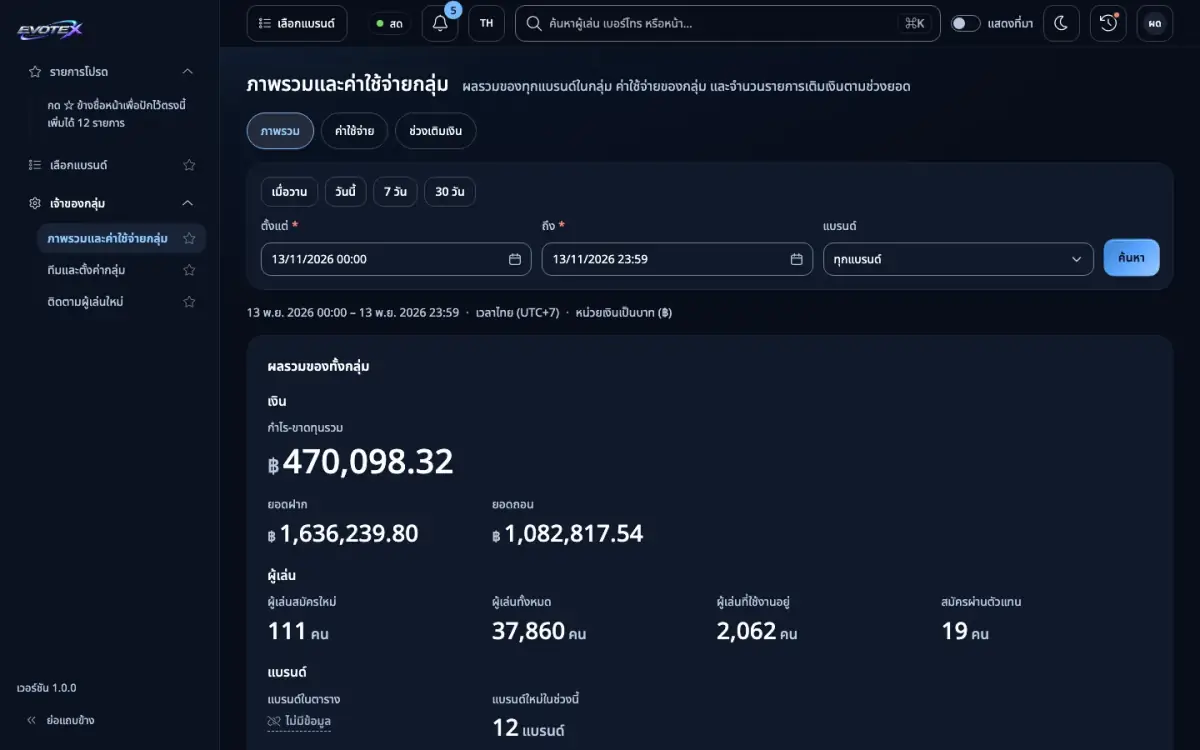
An example of reading the image: the new members box has 110 in total, split by brand so you see right away who got how many:
- The first brand: 49
- The second brand: 34
- The third brand: 27
The page's table by brand has columns that each answer a different question.
| Column | What you learn from reading it |
|---|---|
| Brand | Which brand this row is. Click the row to open the brand's details panel |
| Deposits | The brand's deposits in the chosen period |
| Withdrawals | The brand's withdrawals in the same period |
| Net | Deposits minus withdrawals. Use it to see which brand is going negative |
| Pending withdrawals right now | The number of withdrawals still waiting for a decision. Use it to see which brand to go to first |
The table's tools in the demo:
- A Has pending withdrawals filter and a Negative net filter, to leave only the rows you need to look at
- Tick 2 or more brands and press Compare. The compare panel draws bars against the highest value in each topic
- Export the whole table as CSV, or export only the selected rows
- Click a row for a shortcut to that brand's withdrawal queue
- Open a brand directly with a link that ends with the brand code, for example #B-1
- Choose a date range like every page in the back office, compared with the previous period of the same length
Good to know: the banner on the page says itself that numbers for brands other than the one you're viewing are estimates. A dot beside a heading means that field isn't connected to a live system yet. So the cross-brand totals are a sample for now. Ask our team where these numbers come from at setup, and whether they match the numbers on each brand's Today page.
Executive summary: a file the owner can take into the next discussion
The Executive summary page shows the brand you're viewing in 3 fixed periods: today, 7 days, and this month, with the net, new members, and pending withdrawals right now. If you choose to view the whole group, you see each brand for the chosen period. You can export CSV with 12 rows, which is 3 periods times the group and 3 brands (can be tried in the demo).
To say plainly: this page exports only as a CSV file. There is no PDF, no sending by email, and no scheduled automatic sending. The screen says so itself. If your team has to send a report to shareholders every week, ask our team how it would be done. Read more about the numbers to open every day in reports a brand owner should open every day (page in Thai)
Who sees what: the scope of permissions
When you assign a role to a person, the admin can choose the scope in four ways:
- One brand
- Some chosen brands
- All brands in a group, including brands opened later
- All groups, which can be granted only to the platform team
You can see this on the Team and permissions page of the demo, which has scope tabs for brand, group, and platform according to the viewer's view. The menus are split by level too.
| Level | Number of menus | Example menus at this level |
|---|---|---|
| Brand | 27 | Today, Withdrawals, Deposits, Players, Promotions, Chat, Player site, Team and permissions |
| Group owner | 5 | Group home page, tracking campaigns, sign-in history, the group's domains, admin risk |
| Platform | 9 | Brands and groups, domains of every brand, roles at every level, the Telegram bot, sign-in history of every group |
The numbers 27, 5, and 9 are the numbers of menus in the demo. They aren't the number of features in the package.
What has to be said plainly: in the demo, the side menu is still the same for every account at the same level. A finance account sees the same menus as a brand owner. Hiding menus by real role is the job of the backend system at setup. What you can see in the demo is the role editor, the permission table for every role, and a simulator for three viewer views.
On separating data between groups: according to the API contract the back office team wrote, an account in one group can't open another group's brand. This is designed, not in the demo. The demo never called a live system, so it can't prove this to you. Ask our team how they check it for you at setup.
What the platform team does for every brand at once
At the platform level there are extra platform team menus, which an ordinary brand owner account doesn't see. The Brands and groups page has three tabs: groups and brands, platform announcements, and the central banner images.
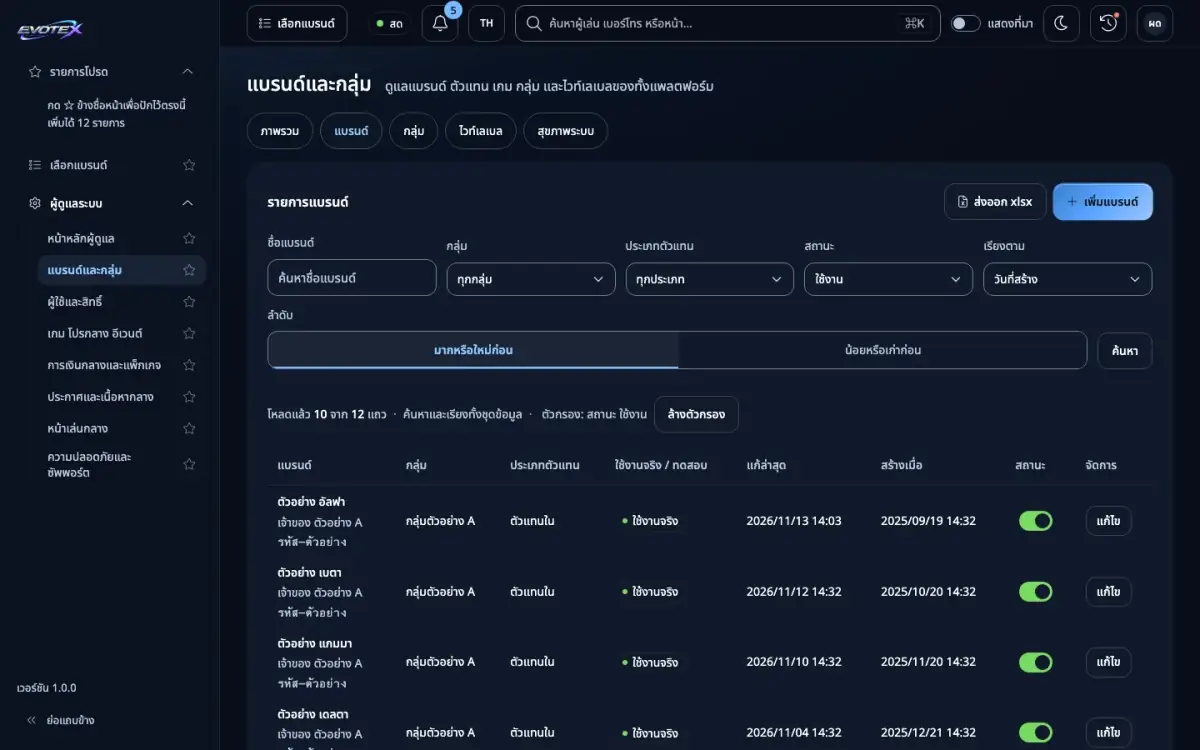
What you can do from this page in the demo:
- Create a new group with its group owner in one step. The system checks before writing, so no half-made group is left behind (can be tried in the demo)
- Announce to every brand at once. Write it in both Thai and English, schedule it in advance, choose the brands that will see it, and attach a link. Brands see the announcement at the bell. The count of people who have read it isn't connected to a live system yet (sample)
- Arrange the central banner images that every brand can choose to use. The image library isn't connected to a live system yet (sample)
- See which groups already enforce 2FA, filter to the groups that don't yet, and filter to the brands that are closed
- Send a message into the Telegram groups of several brands at once. Platform team only, and once sent it can't be recalled (can be tried in the demo)
On domains: the platform team's Domains and central settings page adds, verifies, and moves the DNS of every brand from one place. All three steps need an OTP. After you add a domain, the system gives you 2 name server values to set at the domain vendor, and keeps a history of domain changes per brand (can be tried in the demo). A brand sees its own domains on the Settings page, read-only. This is useful when a brand changes its web address, because the platform team can move to a new domain without touching each brand one by one.
An example of deciding from the number of brands
This example is a made-up scenario, not a real customer's.
| Situation | Where to start | Short reason |
|---|---|---|
| One brand, no plan to add more | The EVOTEX package | You don't need the Group home page |
| Three brands, the same owner | Custom terms | You get the table to compare brands and the all brands in the group option |
| Four brands, and two more brands to open later, in one group | Custom terms. Say the total number of brands you have in mind | Our team prices by the number of brands agreed |
| Two groups, different owners, that an admin has to watch at once | Custom terms | There is a central screen that views several groups |
Before you decide, try the demo from two views, the brand owner's view and the platform team's view. The name card under the side menu has a Switch view (experimental) button. This button exists only in the demo. In a real system, the backend system decides who sees what.
What to ask our team
This page can't confirm these things, so ask when you agree the scope.
- Where do the cross-brand numbers on the Group home page come from, and do they always match each brand's Today page?
- If you open an additional brand in an existing group, how are custom terms charged for the addition?
- If you change terms midway through the contract, for example from one brand to several brands, when can you do it and how is it charged?
- Does the side menu hide by real role in use, and how can it be shown to you?
- Can the table to compare brands be sent to the owner as a scheduled report, because the Executive summary page doesn't have that yet?
- For each brand's domain, who owns it, and can you move it out?
- How long does it take to open a new brand in an existing group, and how is it different from opening the first brand?
- Can each brand in a group use a different player site template, and how does that count against the number of templates agreed?
Keep reading
- Worked examples of launch costs: the total budget for one brand, and how to request a price if you have several brands
- Reports a brand owner should open every day (page in Thai): the numbers a group owner should read first
- What a back office must have: a 12-point checklist split by role
- The multi-brand back office (page in Thai): a short page explaining the three levels
- Team and permissions, feature by feature: see images of the Team and permissions page
- Try the back office with sample data (page in Thai): try switching brands and comparing brands right now, with no sign-up
Our team's target is to open a new brand within 14 to 21 working days after the scope is agreed. See what the package includes on the packages and pricing page (page in Thai)
Related features
- The group home page: a by-brand table sample in the demo
- Choose a brand or group to enter sample in the demo
- Create a new group with its group owner sample in the demo
Related reading
Worked examples of launch costs
Work out step by step what a 93% hold rate comes to in money, and how to request a price for several brands.
What a back office must have
A good back office gives the owner the whole picture on one page and lets the finance team close money work fast.

Request a demo
Want our team to look at the real thing with you? Request a demo.